Director Tutorial 1 - The Director Development Environment
Macromedia have adopted a Theatre metaphor for Director's
development environment, so you'll be meeting elements like
the Cast, Script, Stage, and Score among others.
To begin let me introduce you to the three most important
elements of the development environment:
1. The Stage: Open the stage (Ctrl. 1 or Window >
Stage). The stage is what the viewer (your audience) will
see - if you like it is what a theatre audience will see when
a play is performed, they will not see back stage or the mechanics
that operate stage props etc.

Figure 1.1: The Stage
On stage we can have a great many elements like graphics,
text, digital video and so on. All of these element are referred
to as sprites.
2. The Cast: Open the cast (Ctrl. 3 or Window >
Cast). Think of the cast as a multimedia database.
It is in the cast that ALL of the assets used in your movie
are stored.
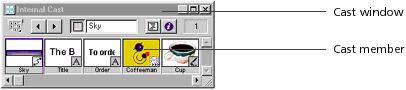
Figure 1.2: The Cast
The cast is made up of a series of thumbnails or windows
that contain one piece of media, so a cast member can either
be 1 graphic, or 1 sound file, or 1 piece of text, etc.
When a cast member appears on stage it is considered to be
a copy or child of the cast member and referred to as a sprite.
Think of a cast member as a parent or master of any sprites
made from it, this means that if you alter the master cast
member then all sprites made from it are also altered.
3. The Score: Open the score (Ctrl. 4 or Window >
Score). The score is a set of instructions describing how
sprites appear, behave, change and interact over time. The
score window represents a kind of "map" of the movie's
action in which all the different entities that comprise the
content are described.
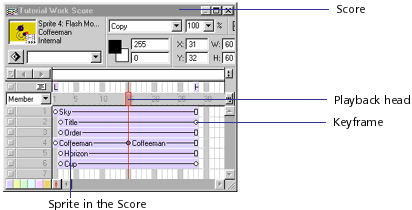
Figure 1.3: The Score
The score is time/frame based and the stage contents
dependents on what the playback head sees in a given
frame. The rate at which the playback head moves is dependent
on the fps (frames per second) setting. If the fps is set
to 15, then it will take 1 second to playback 15 frames.
Channels are the rows in the Score that contain sprites for
controlling media (remember a Sprite is an instance of a Cast member).
Sprite channels are numbered
and contain the sprites that control all visible media
in the movie.
A sprite is an object that controls when, where, and
how cast member media appear in a movie. Use the Stage to
control where a sprite appears and use the Score to control
when it appears in the movie.
Special effects channels at the top of Score contain behaviors
as well as controls for the tempo, palettes, transitions,
and sounds. The Score displays channels in the order shown
in figure 1.4.
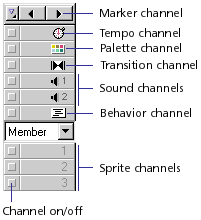
Figure 1.4: The Effects Channels
In this tutorial you have learned about:
- the stage (ctrl. 1)
- the cast (ctrl. 3) or multimedia database
- the score (ctrl. 4) and the playback head
- cast members and sprites
- the effects channels
Back to director tutorials
PLEASE COMPLETE THE FOLLOWING QUIZ AND SURVEY
Click here to take the test
Click here to take the learning and usability survey

