Director Tutorial 12 - Publishing your movie
We need to package our movie so that our users
can play it. We want people to be able to use our
movie regardless of whether Director is installed
on their system.
We will distribute our movie in two ways:
- By creating a projector for distribution by
CD or DVD
- By creating a Shockwave movie for distribution
over the internet
Projector
A Projector is a play-only version of a movie.
Projectors play like any other movie on a computer,
except the projector can;t be opened an edited.
Cross Platform?
To create a Director projector that runs on Windows
and the Mac OS you must have access to machines
running both operating systems. You must have
Director installed on both machines and both machines
must be running the same version of Director.
1. To create a projector choose File > Create
Projector.
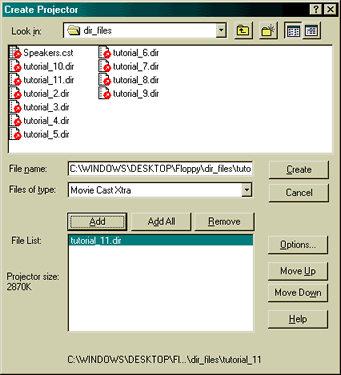
Figure 12.1: Create Projector
2. Find the director movie that you want to create
a projector from.
3. Select the movie an click ADD.
4. Click OPTIONS, this opens the Project Options
dialog box (see figure 12.2 below).
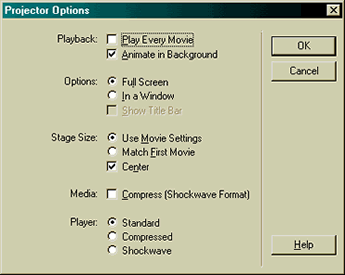
Figure 12.2: Projector Options
5. Select "Full Screen".
If you wish you can choose to compress
you movie using Shockwave technology by selecting
Compress (Shockwave Format from the Media option.
This would result in a projector with a much smaller
file size.
In addition, you could further reduce
the file size of your projector by opting for a
"Compressed" or "Shockwave"
player.
6. Click OK to proceed with the projector
creation process.
7. Click Create on the "Create
Projector" dialog and enter a name for you
projector in the "Save Projector As" dialog
box.
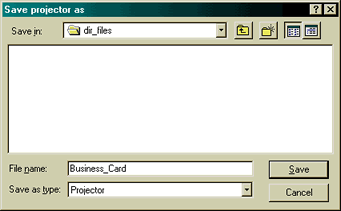
Figure 12.3: Save Projector As
8. Click "Save" and you've
created your projector!
Shockwave
Shockwave was developed by Macromedia to let developers
prepare multimedia for the World Wide Web and allow
Web users interact with a multimedia production
once it's posted on the Web. Operating Systems,
Web Browsers or other software Products may include
Shockwave, or you can download it from the Macromedia
Web site.
!. Open the movie that you'd like to "Shock"
2. Select Xtras > Shockwave for Audio Settings
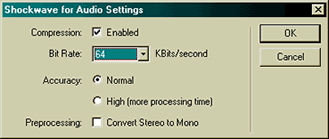
Figure 12.4: Shockwave For Audio
Settings
An Xtra is a utility program that
adds additional features to Director. Director comes
with several Xtras, including the Shockwave for
Audio Setting Xtra. There are many more Xtras for
third party developers.
Shockwave Audio is a technology that
makes sounds smaller and plays them faster from
a disk or over the internet.
3. Check the enabled box to enable
compression for the audio embedded in the movie,
then click OK to close the dialog box.
4. Choose File > Save as Shockwave
Movie.
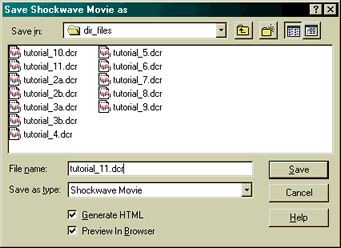
Figure 12.5: Save as Shockwave Movie
5. Choose a name for you movie.
6. Select "Create HTML"
and "Open in Browser", this will embed
your movie in a HTML page, open your default browser
and play your movie.
In this tutorial you have learned
how to:
- create a stand alone projector for playback
via a CD or DVD
- shock a Director movie for playback over the
internet
- automatically embed a Shockwave movie in a Web
page
Back to director tutorials

